RabbitMQ Streams for Algorithmic Trading
Building scalable, resilient trading infrastructure with RabbitMQ Streams for market data distribution and order routing.
Introduction
Most trading systems fail not because of bad algorithms, but because of infrastructure brittleness. A single market data feed lag, a dropped order, or a network glitch can wipe out profits.
RabbitMQ Streams is a distributed message broker designed for exactly these problems: guaranteed delivery, persistent storage, replay capability, and horizontal scaling. Unlike traditional request-response systems, Streams enable:
- Multiple consumers of the same market data without coupling
- Replay from history - rewind and reprocess all trades for debugging
- Backpressure handling - gracefully handle data spikes without dropping messages
- Fault tolerance - automatic failover and recovery
This guide shows how to build production-grade trading infrastructure on RabbitMQ Streams.
What You’ll Learn
- RabbitMQ Streams fundamentals and why they’re ideal for trading infrastructure
- Setting up market data streams with the Python
rstreamclient - Consumer patterns: basic, batching, single-active, and replay consumers
- Event sourcing architecture for complete audit trails
- Backpressure handling and flow control strategies
- Consumer groups for horizontal scaling
- Real-time aggregation across multiple exchanges
- Production best practices and monitoring with Streamlit dashboard
Prerequisites
- Python 3.10+ programming experience
- Familiarity with async/await patterns and asyncio
- Understanding of messaging concepts (producers, consumers, queues)
- Docker and Docker Compose basics
- Trading concepts (market data, ticks, VWAP, bid/ask)
System Architecture Overview
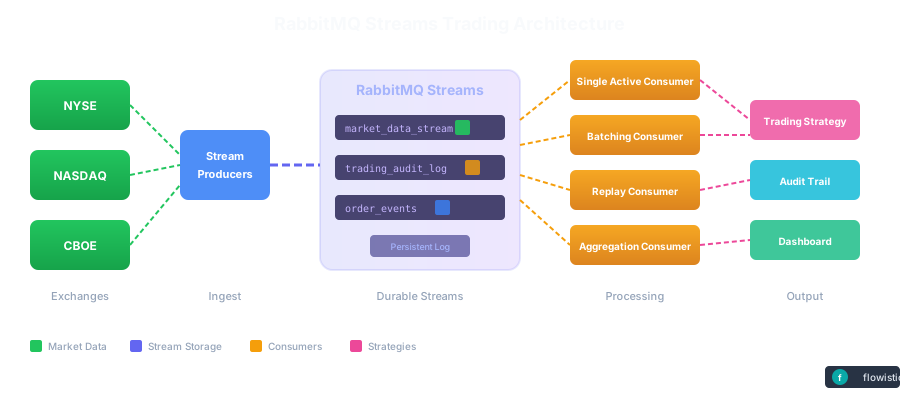
The following diagram illustrates the complete trading infrastructure built on RabbitMQ Streams. Market data flows from multiple exchanges through producers into persistent streams, where various specialized consumers process the data for different purposes.
Key Architecture Components
| Component | Role | Pattern |
|---|---|---|
| Stream Producers | Ingest market data from exchanges | Async publishing with confirmations |
| Persistent Streams | Durable append-only logs | Replay from any timestamp |
| Single Active Consumer | Ordered processing with failover | Leader election per consumer group |
| Batching Consumer | High-throughput aggregation | Micro-batching for efficiency |
| Replay Consumer | Historical analysis & debugging | Time-based offset consumption |
| Aggregation Consumer | Cross-stream correlation | Multi-stream joins & VWAP |
Why RabbitMQ Streams for Market Data?
| Feature | Benefit for Market Data |
|---|---|
| Persistent Log | Replay historical data for backtesting strategies |
| High Throughput | Handle millions of ticks per second |
| Time-based Consumption | Start consuming from any point in time |
| Offset Tracking | Resume from last position after failures |
| Single Active Consumer | Maintain ordering with automatic failover |
| Non-destructive Reads | Multiple consumers read the same data |
Part 1: RabbitMQ Streams Fundamentals
RabbitMQ Streams are append-only logs (like Kafka), but with RabbitMQ’s simplicity. Every message is persisted, and consumers can replay from any point in time.
Project Structure
rabbitmq-streams-trading/
├── docker-compose.yml              # RabbitMQ with Streams enabled
├── pyproject.toml                  # Project config & dependencies (uv)
├── src/
│   ├── __init__.py
│   ├── config.py                   # Stream configuration
│   ├── models.py                   # MarketData model with Pydantic
│   ├── producer.py                 # Simulated market data publisher
│   ├── consumer.py                 # Basic consumer with offset options
│   ├── single_active_consumer.py   # Ordered processing with failover
│   ├── batching_consumer.py        # High-throughput micro-batching
│   ├── replay_consumer.py          # Historical data replay
│   └── dashboard.py                # Streamlit visualization dashboard
└── README.md
Quick Start
1. Start RabbitMQ with Streams
cd rabbitmq-streams-trading
docker compose up -d
Wait for RabbitMQ to be healthy and access the management UI at http://localhost:15672 (guest/guest)
2. Install Dependencies with uv
uv sync
3. Run the Producer
uv run python -m src.producer
4. Run the Streamlit Dashboard
uv run streamlit run src/dashboard.py
Market Data Publisher
import pika
from pika.adapters.blocking_connection import BlockingConnection
import json
from datetime import datetime

class MarketDataPublisher:
    """Publish tick data to RabbitMQ Streams"""

    def __init__(self, rabbitmq_host: str = "localhost",
                 stream_name: str = "market_data"):
        self.stream_name = stream_name

        # Connect with stream plugin
        credentials = pika.PlainCredentials("guest", "guest")
        parameters = pika.ConnectionParameters(
            host=rabbitmq_host,
            credentials=credentials
        )

        self.connection = pika.BlockingConnection(parameters)
        self.channel = self.connection.channel()

        # Declare stream (idempotent - safe to call multiple times)
        self.channel.queue_declare(
            queue=stream_name,
            durable=True,
            arguments={
                'x-queue-type': 'stream',
                # Retention: keep messages for 7 days
                'x-max-age': '7d',
                # Max size: 10GB per stream
                'x-stream-max-length-bytes': 10737418240
            }
        )

    def publish_tick(self, tick_data: dict):
        """Publish a single tick to the stream"""

        message = json.dumps({
            'timestamp': datetime.utcnow().isoformat(),
            'ticker': tick_data['ticker'],
            'price': tick_data['price'],
            'volume': tick_data['volume'],
            'bid': tick_data.get('bid'),
            'ask': tick_data.get('ask'),
        })

        # Publish with confirmation
        self.channel.basic_publish(
            exchange='',
            routing_key=self.stream_name,
            body=message.encode(),
            properties=pika.BasicProperties(
                delivery_mode=2,  # Persistent delivery
                content_type='application/json'
            )
        )
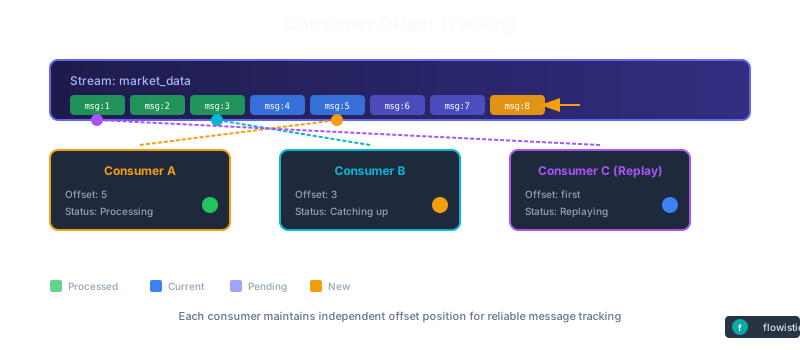
Key concept: Unlike queues where messages disappear after consumption, Streams persist all messages. Consumers independently track their position in the stream—new consumers can start from the beginning or the tail.
Part 2: Stream Consumers with Offset Management
A single market data stream can feed multiple trading strategies. Each strategy independently consumes messages from wherever it wants in the stream.
Basic Consumer with Offset Options
from src.consumer import MarketDataConsumer
from src.config import StreamConfig

config = StreamConfig.defaults()
consumer = MarketDataConsumer(config)

await consumer.start()

# Start from the beginning (replay all)
await consumer.consume_from_first(handler)

# Start from the last message
await consumer.consume_from_last(handler)

# Only new messages
await consumer.consume_from_next(handler)

# Resume from a specific offset
await consumer.consume_from_offset(12345, handler)

# Start from a specific time
from datetime import datetime
await consumer.consume_from_timestamp(
    datetime(2024, 1, 15, 9, 30),
    handler
)

# Filter by symbols
await consumer.consume_symbols(
    offset_spec,
    handler,
    {"AAPL", "GOOGL"}
)
Multiple Consumers
RabbitMQ Streams supports multiple concurrent consumers reading from the same stream:
# Each consumer reads independently - non-destructive reads
consumer1 = MarketDataConsumer(config)
consumer2 = MarketDataConsumer(config)
consumer3 = MarketDataConsumer(config)

# All three can consume from the same stream simultaneously
# Each tracks its own offset independently
await consumer1.consume_from_first(handler1)  # Reads all from beginning
await consumer2.consume_from_last(handler2)   # Reads only latest
await consumer3.consume_from_offset(5000, handler3)  # Reads from offset 5000
Key benefits:
- Non-destructive reads: Unlike queues, messages aren’t removed after consumption
- Independent offsets: Each consumer tracks its own position
- Parallel processing: Multiple consumers can process concurrently
- Replay capability: New consumers can read historical data
Part 3: Single Active Consumer Pattern
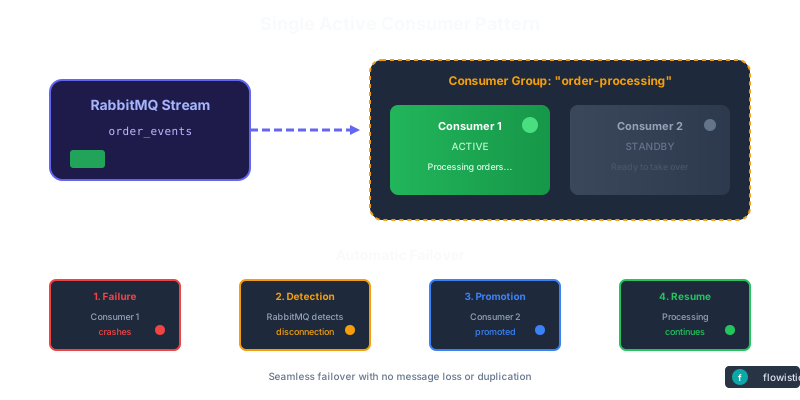
Ensures ordered processing with automatic failover. When the active consumer fails, a standby instance is automatically promoted to take over—resuming from the exact offset where the failed consumer left off.
from src.single_active_consumer import SingleActiveConsumer

consumer = SingleActiveConsumer(config, "processor-1")

async def handle_message(data: MarketData, offset: int):
    # Only the active consumer processes messages
    await process_market_data(data)

await consumer.start(handle_message)

# Check if this instance is active
if consumer.is_active:
    print("I am the active consumer")
Run multiple instances for high availability:
# Terminal 1
uv run python -m src.single_active_consumer consumer-1

# Terminal 2 (standby, will activate if consumer-1 fails)
uv run python -m src.single_active_consumer consumer-2
Part 4: High-Throughput Batching Consumer
For high-throughput scenarios with aggregation:
from src.batching_consumer import BatchingConsumer

consumer = BatchingConsumer(
    config,
    batch_size=1000,
    batch_timeout_ms=100,
)

async def handle_batch(batch: list[MarketData]):
    # Process batch of market data
    stats = BatchingConsumer.aggregate_by_symbol(batch)

    # Calculate VWAP per symbol
    for symbol, stat in stats.items():
        print(f"{symbol}: VWAP={stat.vwap}, High={stat.high}, Low={stat.low}")

await consumer.start(handle_batch)
Batching benefits:
- Reduced processing overhead
- Aggregate statistics (VWAP, high/low, volume)
- Better throughput for downstream systems
Part 5: Historical Data Replay
For backtesting and historical analysis:
from src.replay_consumer import ReplayConsumer
from datetime import datetime

consumer = ReplayConsumer(config)
await consumer.start()

# Replay all data
result = await consumer.replay_all(timeout_seconds=60)

# Replay specific time range
result = await consumer.replay_time_range(
    from_time=datetime(2024, 1, 15, 9, 30),
    to_time=datetime(2024, 1, 15, 10, 0),
    timeout_seconds=60,
)

# Replay specific symbols
result = await consumer.replay_symbols(
    {"AAPL", "GOOGL", "MSFT"},
    timeout_seconds=60,
)

# Access results
aapl_data = result.get_data_for_symbol("AAPL")
result.print_summary()
Replay use cases:
- Strategy backtesting
- Bug investigation and debugging
- Compliance audits
- Training ML models on historical data
Part 6: Event Sourcing - Complete Audit Trail
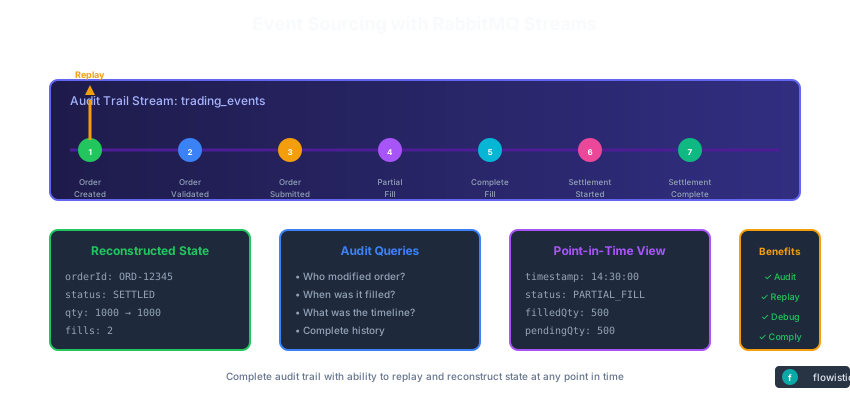
Every trade, order, and decision should be logged immutably. RabbitMQ Streams enables complete event sourcing: rebuild any historical state by replaying events.
from enum import Enum
from dataclasses import dataclass, asdict

class EventType(Enum):
    MARKET_DATA = "market_data"
    ORDER_CREATED = "order_created"
    ORDER_FILLED = "order_filled"
    ORDER_CANCELLED = "order_cancelled"
    TRADE_EXECUTED = "trade_executed"
    POSITION_UPDATED = "position_updated"
    ERROR = "error"

@dataclass
class TradingEvent:
    """Immutable event in the audit log"""
    event_type: EventType
    timestamp: str
    data: dict

    def to_json(self) -> str:
        return json.dumps(asdict(self))

class AuditLogPublisher:
    """Publish all trading events to audit stream"""

    def __init__(self, rabbitmq_host: str = "localhost"):
        self.stream_name = "trading_audit_log"

        # Create audit stream with longer retention
        self.channel.queue_declare(
            queue=self.stream_name,
            durable=True,
            arguments={
                'x-queue-type': 'stream',
                # Keep audit logs for 1 year
                'x-max-age': '365d'
            }
        )

    def log_order_created(self, order_id: str, ticker: str,
                         quantity: int, price: float, side: str):
        """Log order creation"""
        event = TradingEvent(
            event_type=EventType.ORDER_CREATED,
            timestamp=datetime.utcnow().isoformat(),
            data={
                'order_id': order_id,
                'ticker': ticker,
                'quantity': quantity,
                'price': price,
                'side': side
            }
        )
        self._publish_event(event)
Power of event sourcing: At 3:47 PM, you discover a bug. Replay the audit log from 9:30 AM. See every trade that was executed based on the buggy logic. Calculate exact P&L impact. Perfect for compliance and debugging.
Part 7: Handling Backpressure & Flow Control
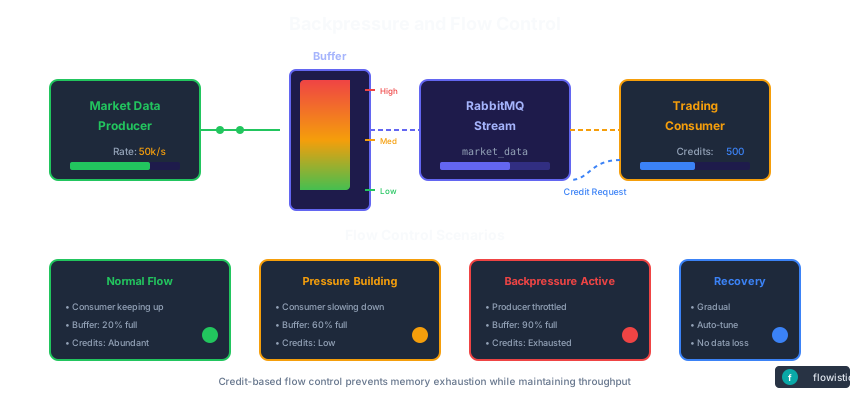
Market data can spike (earnings announcements, flash crashes). Naive systems drop messages. RabbitMQ Streams handle this with prefetch limits and consumer groups.
class BackpressureAwareConsumer:
    """Process stream messages with proper flow control"""

    def __init__(self, rabbitmq_host: str = "localhost",
                 stream_name: str = "market_data",
                 prefetch_count: int = 100):
        self.stream_name = stream_name
        self.prefetch_count = prefetch_count

        # Set prefetch: process max 100 messages before requiring ACK
        # Higher prefetch = better throughput, but more memory
        # Lower prefetch = lower latency
        self.channel.basic_qos(prefetch_count=prefetch_count)

    def process_with_timeout_and_retry(self, callback,
                                       max_retries: int = 3):
        """Handle slow processing with retry logic"""

        def wrapped_callback(ch, method, properties, body):
            tick = json.loads(body.decode())

            retry_count = 0
            while retry_count < max_retries:
                try:
                    callback(tick)
                    ch.basic_ack(delivery_tag=method.delivery_tag)
                    break
                except Exception as e:
                    retry_count += 1

                    if retry_count >= max_retries:
                        # Give up, send to dead letter queue
                        self._send_to_dlq(tick, str(e))
                        ch.basic_nack(delivery_tag=method.delivery_tag,
                                     requeue=False)
                    else:
                        # Exponential backoff
                        time.sleep(0.5 * retry_count)
Flow control: When strategy processing slows down, RabbitMQ automatically throttles incoming messages. No data loss, no crashes.
Part 8: Consumer Groups - Scaling Strategies
Run multiple instances of the same strategy. Consumer groups automatically distribute messages so each is processed exactly once.
class ConsumerGroup:
    """Distribute work across multiple consumer instances"""

    def create_consumer_in_group(self, consumer_id: str,
                                callback: Callable):
        """Join consumer group to process stream partitions"""

        # RabbitMQ Streams automatically partition data across consumers
        # Each message processed by exactly one consumer in the group

        self.channel.basic_qos(prefetch_count=100)

        # Consumer tag identifies this instance in the group
        self.channel.basic_consume(
            queue=self.stream_name,
            on_message_callback=wrapped_callback,
            consumer_tag=f"{self.group_name}_{consumer_id}",
            arguments={'x-stream-offset': 'last'}
        )

# Deploy multiple strategy instances
def deploy_strategy_instances(num_instances: int = 3):
    """Deploy multiple instances of trading strategy"""

    threads = []
    for i in range(num_instances):
        t = threading.Thread(target=strategy_worker, args=(i,))
        t.daemon = True
        t.start()
        threads.append(t)
Scaling: Start with 1 strategy instance. As volume grows, launch 2, 3, 10 instances. RabbitMQ automatically distributes work. Each message processed exactly once.
Part 9: Real-Time Aggregation Across Exchanges
Combine market data from multiple exchanges into a single stream for cross-exchange strategies.
class MultiExchangeAggregator:
    """Aggregate ticks from multiple exchanges into unified stream"""

    def __init__(self, rabbitmq_host: str = "localhost"):
        self.unified_stream = "unified_market_data"

    def aggregate_exchanges(self, exchange_names: list):
        """Subscribe to all exchanges and republish to unified stream"""

        for exchange in exchange_names:
            exchange_stream = f"market_data_{exchange.lower()}"

            # Each exchange in its own thread
            consumer_thread = threading.Thread(
                target=self._consume_and_aggregate,
                args=(exchange, exchange_stream)
            )
            consumer_thread.daemon = True
            consumer_thread.start()

    def _consume_and_aggregate(self, exchange: str, stream_name: str):
        """Consume from exchange stream and republish"""

        def callback(ch, method, properties, body):
            tick = json.loads(body.decode())

            # Add exchange metadata
            enriched_tick = {
                **tick,
                'exchange': exchange,
                'received_at': datetime.utcnow().isoformat()
            }

            # Republish to unified stream
            self.channel.basic_publish(
                exchange='',
                routing_key=self.unified_stream,
                body=json.dumps(enriched_tick).encode(),
            )
Cross-exchange strategies: Subscribe to unified stream. Process ticks from NYSE, NASDAQ, CBOE in order. Execute arbitrage or statistical strategies across venues.
Part 10: Real-Time Dashboard with Streamlit
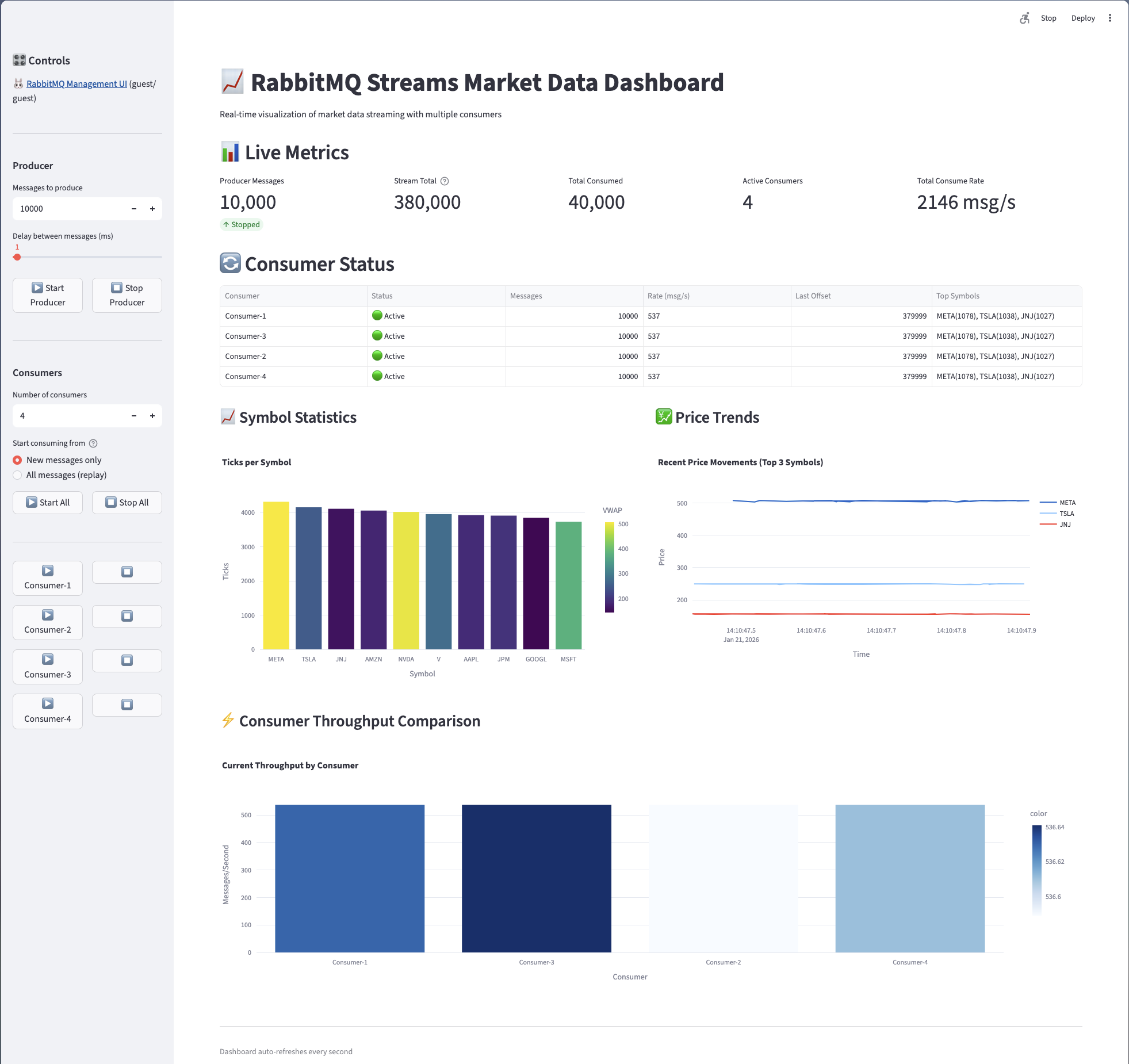
The project includes a comprehensive Streamlit dashboard for monitoring:
Dashboard Features
- Live Metrics: Producer messages, stream total, total consumed, active consumers, consume rate
- Consumer Status: Real-time status, message counts, rates, last offsets, top symbols per consumer
- Symbol Statistics: Ticks per symbol bar chart with VWAP calculations
- Price Trends: Real-time price movement charts for top symbols
- Consumer Throughput Comparison: Side-by-side throughput visualization
Running the Dashboard
uv run streamlit run src/dashboard.py
The dashboard auto-refreshes every second, providing real-time visibility into your streaming infrastructure.
Market Data Model
from src.models import MarketData
from decimal import Decimal
from datetime import datetime, timezone

tick = MarketData(
    symbol="AAPL",
    bid_price=Decimal("185.50"),
    ask_price=Decimal("185.52"),
    bid_size=Decimal("500"),
    ask_size=Decimal("300"),
    last_price=Decimal("185.51"),
    last_size=Decimal("100"),
    volume=Decimal("5000000"),
    timestamp=datetime.now(timezone.utc),
    exchange="NASDAQ",
    sequence_number=12345,
)

# Computed properties
print(tick.spread)     # 0.02
print(tick.mid_price)  # 185.51

# Serialization
bytes_data = tick.to_bytes()
restored = MarketData.from_bytes(bytes_data)
Configuration
Stream Settings
from src.config import StreamConfig

config = StreamConfig(
    host="localhost",
    port=5552,
    username="guest",
    password="guest",
    stream_name="market-data",
    max_age_seconds=86400,           # Retain data for 24 hours
    max_length_bytes=10_000_000_000, # Max 10 GB
    max_segment_size_bytes=500_000_000,  # 500 MB per segment
)
Best Practices for Production
- Set retention policies: Keep audit logs forever, market data for 30 days
- Monitor consumer lag: Alert if any strategy falls behind
- Test failover: Simulate broker crashes, verify recovery
- Use consumer groups: Scale horizontally as volume grows
- Implement dead letter queues: Never silently drop messages
- Log everything: Stream is immutable audit trail
- Version your messages: Add
versionfield for schema evolution
Performance Tips
- Use Batching: The
BatchingConsumeraggregates messages for better throughput - Tune Buffer Sizes: Adjust
batch_sizeandbatch_timeout_msbased on your latency requirements - Parallel Processing: Use
asyncio.gather()to process batches concurrently - Client-side Filtering: Filter symbols client-side or use Super Streams for server-side partitioning
- Offset Tracking: Use
subscriber_namefor automatic offset recovery after restarts
Technology Stack
| Component | Purpose |
|---|---|
| Python 3.10+ | Async/await programming |
| rstream | Official RabbitMQ Stream Python client |
| Pydantic | Data validation and serialization |
| orjson | Fast JSON serialization |
| Streamlit | Real-time dashboard visualization |
| Docker Compose | RabbitMQ with Streams plugin |
| uv | Modern Python package manager |
Next Steps
- Super Streams: For partitioned streams with server-side routing
- Deduplication: Add deduplication using message IDs
- Compression: Enable compression for lower network usage
- TLS: Configure TLS for production deployments
Cleanup
docker compose down -v
Get the Code
Full source code available on GitHub
Ready to optimize your system?
Let our team help you implement these strategies and achieve peak performance.
Schedule a Consultation